SmartInn RMS
Invitation testing is now open — each new testing workspace receives 10,000 AI Credits. Learn about AI Credits
AI OPERATIONS FOR SHORT, MEDIUM AND LONG STAYS

Manage every stay in one place. Let AI handle the repetitive work.

Manage listings, reservations, finance and daily operations in SmartInn RMS. Ask SmartInn Assistant to complete supported work inside RMS, or use SmartInn Agent Client to delegate supported workflows across RMS and external platforms.

Chat when you want assistance. Delegate when you want the work completed.

10,000 AI Credits for each new testing workspace Sensitive actions remain under human control

Demo workspace · Sample data
A
SmartInn AssistantWork inside RMS
User uploads a fileReservation or transaction source
RMS imports and reviewsBusiness validation remains in RMS
or delegate the complete supported workflow
AC
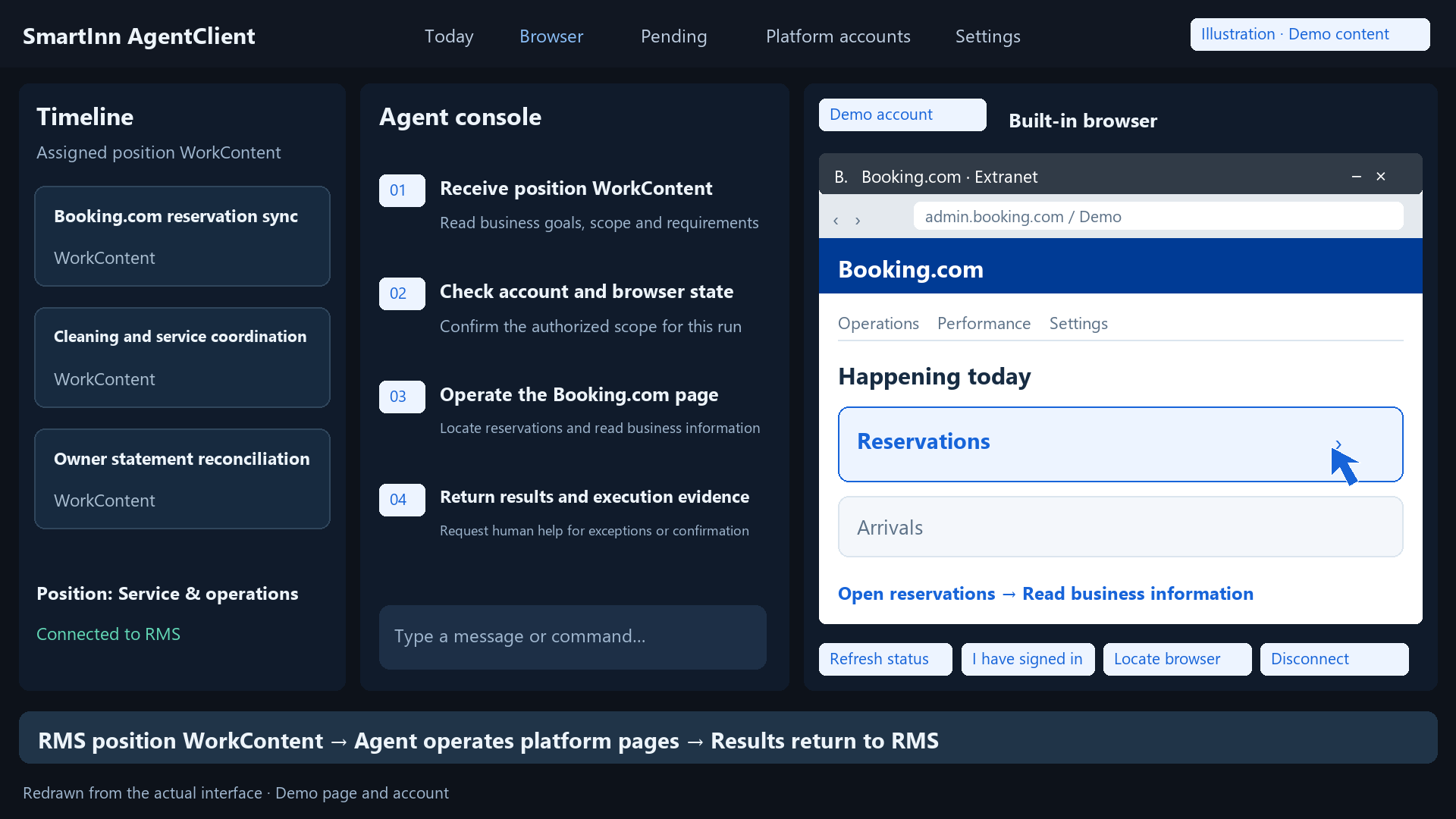
SmartInn Agent ClientWork across platforms and RMS
Retrieve source dataUsing an authorised local Browser Profile
H
Human InterventionMFA, CAPTCHA or uncertain pages pause
Execution steps, result and evidence recorded

Stop running your operations from tabs, exports and memory.

01

Listing records are spread across accounts and platforms.

Bring new listing information into a controlled review queue, check existing identities first and decide what becomes part of RMS.

02

Reservation and transaction files still need manual checking.

Import source files into RMS, preserve unmatched records and review mappings instead of losing data or forcing unsafe matches.

03

The same operational work is repeated every day or every month.

Turn repeatable work into scheduled WorkContent that can be executed, monitored and resumed by SmartInn Agent Client.

04

Generic chat tools do not know the business page you are working on.

Ask SmartInn Assistant from the current RMS page and receive answers based on the page context and approved business knowledge.

TWO WAYS TO WORK WITH AI

Ask SmartInn to do it inside RMS. Or delegate the entire workflow.

Use SmartInn Assistant to query data, upload files and complete supported RMS functions through conversation. When work also involves external platforms, SmartInn Agent Client can complete the supported workflow across both the platform and RMS.

WORK INSIDE RMS

Manage SmartInn RMS through conversation

Ask questions about the page you are viewing, upload business files, find records and complete supported RMS functions without navigating through every menu.

Your responsibility: You continue to handle any required actions on external websites.
  • Ask about Listings and Reservations
  • Upload Reservation or Transaction files
  • Invoke supported RMS imports
  • Find and explain RMS records
  • Complete supported RMS functions
  • No local installation required
Open SmartInn Assistant
DELEGATE THE WHOLE WORKFLOW

Let Agent Client complete work across platforms and RMS

Assign repeatable work to SmartInn Agent Client. It can operate supported external platforms, retrieve the required information, invoke SmartInn RMS functions and return a complete execution record.

Your responsibility: You define the goal, rules and review conditions. Agent Client completes the supported steps and asks when human verification or judgment is required.
  • Run assigned or scheduled WorkContent
  • Use local Browser Profiles
  • Operate supported and authorised platform steps
  • Download and upload source files
  • Invoke the same RMS AppServices
  • Record steps, results and evidence
  • Pause for Human Intervention when required
Set up Agent Client

Choose the level of help you need.

Capability
SmartInn Assistant
SmartInn Agent Client
Primary use
Use RMS through conversation
Delegate complete operational workflows
Operate SmartInn RMS
Yes
Yes
Operate external platforms
No
For supported and authorised workflows
Obtain external files
User retrieves and uploads them
Agent Client can complete supported retrieval steps
Usage model
Ad-hoc conversation
Run Now or scheduled WorkContent
Installation
None
Windows Agent Client
Multiple platform accounts
Handled by the user
Processed by Agent Client according to WorkContent
Third-party login session
Not used
Stored in the local Browser Profile
MFA / CAPTCHA
User handles all external steps
Workflow pauses and requests human intervention
Result record
RMS business result and Chat response
RMS result, Execution Log, steps and evidence
Business write boundary
RMS AppService
RMS AppService

One goal. Two levels of automation.

Import last month’s reservation records.

You handle the platform. SmartInn handles RMS.
  1. 1

    User opens the booking platform

  2. 2

    User selects the date range

  3. 3

    User downloads the CSV

  4. 4

    User uploads the file in Chat

  5. 5

    SmartInn Assistant invokes the RMS import

  6. 6

    RMS returns imported, duplicate and pending records

Everything your operation needs to stay organised—and less dependent on repetitive admin.

Available

One operational record

Manage Listings, Rooms, short stays, medium stays, long stays, Reservations, Payments and Finance from one workspace.

Available

Import without losing unresolved data

When a Listing, Reservation or Transaction cannot yet be matched, SmartInn keeps it as a reviewable imported record instead of discarding it or forcing the wrong connection.

Available

Review before business data changes

New Listings can enter Pending Review. Imported records can remain pending until the correct mapping is known.

Beta

WorkContent that can actually be executed

Define what should be done, when it should run and which accounts it applies to. Agent Client executes the approved work and reports the result.

Beta

Ask the page you are viewing

Ask about the current Listing, Reservation, Finance record, imported record or WorkContent without first explaining where you are.

Preview

Every action remains visible

See the current work, status, execution steps, results, warnings and requests for human input.

Start with a conversation. Automate when you are ready.

  1. 1

    Create your workspace

    Create your SmartInn RMS workspace and receive 10,000 invitation-testing AI Credits.

  2. 2

    Start managing your business in RMS

    Add or import Listings, Reservations, financial records and short, medium or long-stay operations.

  3. 3

    Use SmartInn Assistant for work inside RMS

    Ask questions, upload files and complete supported RMS functions through conversation. You remain responsible for any required work on third-party websites.

  4. 4

    Set up Agent Client for cross-platform work

    Connect the relevant Platform Accounts and local Browser Profiles so Agent Client can complete supported external-platform and RMS steps as one workflow.

  5. 5

    Turn recurring work into WorkContent

    Define the task, schedule, target accounts, review requirements and success conditions.

  6. 6

    Monitor, review and intervene

    See what was completed, what is waiting, what failed and when the Agent needs human verification or judgment.

SECURITY AND HUMAN CONTROL

AI where it helps. Human control where it matters.

Permissions, review boundaries and human verification stay connected to the same business and execution records.

Local platform credentials

Platform credentials and browser sessions remain protected on the user’s local Agent Client rather than being stored in SmartInn RMS.

Controlled browser actions

Browser actions are limited by allowed domains, operation policies and the current approved WorkContent.

Human verification

MFA, CAPTCHA, suspicious login challenges and uncertain pages pause the workflow and request user input.

Reviewable business writes

Imports, mappings and higher-impact changes remain subject to RMS validation and review.

Execution history

Work status, steps, structured results and human intervention remain connected to the same execution record.

INVITATION TESTING

Start invitation testing with 10,000 AI Credits.

Create a SmartInn RMS workspace, explore RMS and test available Agent workflows. Each new testing workspace receives one 10,000 AI Credit grant.

AI Credits 10,000 Invitation-testing grant

AI Credits are used when SmartInn needs an AI model for tasks such as planning, page understanding or knowledge generation. Ordinary deterministic RMS operations are not presented as the same type of AI usage.

  • One grant per eligible new Workspace
  • No cash value
  • Non-transferable between Workspaces
  • Usage is visible in the Workspace credit ledger
  • Testing capabilities may change during invitation testing
COMMON QUESTIONS

Know what SmartInn does before you begin.

Clear boundaries for RMS assistance, local Agent execution, security and invitation testing.

Who is SmartInn RMS for?

SmartInn RMS is for teams managing listings, rooms, reservations, finance and daily short, medium or long-stay operations in one controlled workspace.

Can I manage short, medium and long stays together?

Yes. SmartInn RMS is designed to keep these stay models with shared operational and financial records while retaining their business differences.

What can SmartInn Assistant do?

It can understand the current RMS page, answer authorised questions, find records, accept files and invoke supported RMS functions through conversation.

Can SmartInn Assistant operate an external booking platform for me?

No. You handle required external website actions and upload retrieved files. Use SmartInn Agent Client for supported and authorised cross-platform workflows.

What is WorkContent?

WorkContent defines the goal, schedule, target accounts, review rules and success conditions for work that Agent Client can execute and report.

What does SmartInn Agent Client do?

It runs supported WorkContent locally, uses authorised Browser Profiles, retrieves information or files, invokes RMS AppServices and records execution evidence.

Does SmartInn RMS store my third-party platform password?

No. Platform credentials and browser sessions remain protected in the local Agent Client Browser Profile.

What happens when the Agent needs MFA or sees a CAPTCHA?

The workflow pauses and requests Human Intervention. The user completes verification or provides judgment before the workflow continues.

What are AI Credits?

AI Credits measure approved AI model usage. Each eligible new invitation-testing Workspace receives one 10,000 Credit grant recorded in its ledger.

Which capabilities are currently available?

Core RMS records, reviewable imports and page-aware assistance are available. Agent workflows are enabled according to their displayed availability and supported platform policy.

How do I start invitation testing?

Create a new Workspace with your name, work email and password, then choose whether to begin inside RMS or set up Agent Client.

Start with SmartInn Assistant. Delegate more when you are ready.

Create your Workspace, receive 10,000 AI Credits and choose whether to begin inside RMS or set up SmartInn Agent Client for supported cross-platform work.